Free AI YouTube Title & Description Generator
In a platform with over 800 million videos, your YouTube metadata is either your biggest asset or your biggest missed opportunity. The good news? A Free AI YouTube Title & Description Generator can fix that — instantly, intelligently, and without burning hours of your time.
In this guide, we’ll walk you through everything you need to know about AI-powered YouTube optimization, and introduce you to the tool we built at Web Visions Pro to help creators like you win the YouTube algorithm — for free.
Read More:
AI in web development | AI Email Automation | Evolution of Web Design
1. Why YouTube Free AI YouTube Title & Description Generator Matters More Than You Think {why titles matter}
YouTube is the world’s second-largest search engine. And just like Google, it relies on text signals to understand, rank, and recommend your content.
Your title is the first thing viewers and the algorithm see. A strong, keyword-rich title tells YouTube exactly what your video is about — and tells viewers why they should click.
Your description is just as powerful. It gives YouTube more context about your content, helps you rank in search, and can even drive traffic from Google. Creators who ignore their descriptions are leaving serious visibility on the table.
The Click-Through Rate Connection
A compelling title directly improves your Click-Through Rate (CTR). Higher CTR signals to YouTube that your content is relevant and engaging — which pushes it to more people.
Even a 1–2% improvement in CTR can mean thousands of extra views over the life of a video. That’s the difference between a video that flatlines and one that goes viral.
Keywords Are the Foundation of YouTube SEO
Without the right keywords in your title and description, your video won’t show up when people search for your topic. YouTube needs those text signals to categorize and surface your content.
This is exactly why smart keyword placement — done consistently — is one of the highest-leverage things you can do for channel growth.
2. The Real Problems Creators Face Every Upload Day {creator problems}
Most creators are brilliant at making videos. Writing metadata? That’s a different story.
Here are the most common frustrations we hear from YouTubers, marketers, and business owners who upload regularly:
Writer’s Block Is Real
You’ve just spent hours filming and editing. Then you stare at the title field — blank. Coming up with something catchy AND keyword-optimized while you’re mentally exhausted is genuinely hard.
Poor Optimization = Poor Performance
Most creators write titles based on gut feeling, not data. They miss high-volume keywords, use vague language, and write descriptions that are either too short or stuffed with irrelevant text.
Time Is the Biggest Bottleneck
Researching keywords, writing multiple title variations, crafting a description with proper structure, adding timestamps and CTAs — it can take 30–60 minutes per upload just for metadata.
For creators publishing multiple times a week, that’s hours of lost time every single week.
This is exactly why a free AI YouTube title generator has become an essential tool — not a luxury.
3. What Does an AI YouTube Title & Description Generator Actually Do? {what it does}
An AI YouTube tool uses large language models trained on vast amounts of content to generate optimized, platform-specific text — fast.
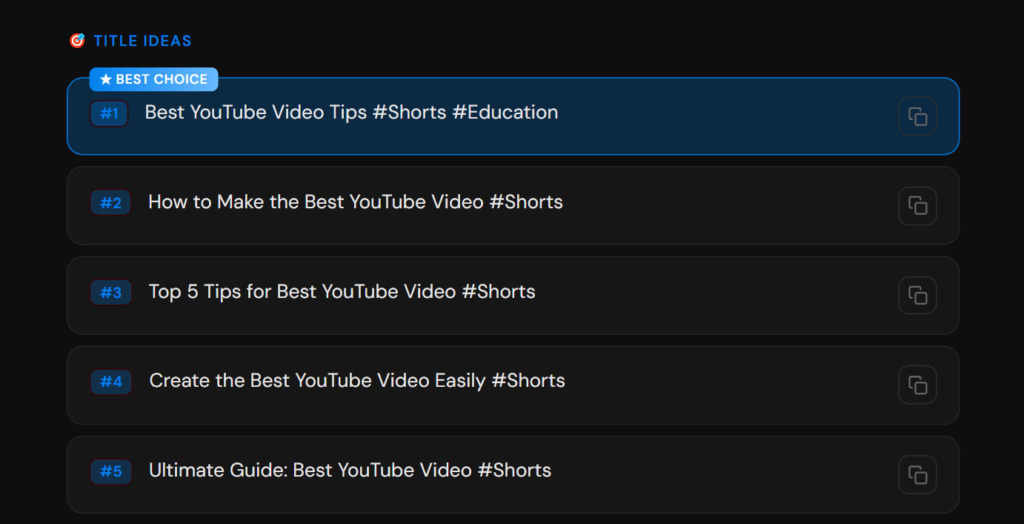
You give it your video topic (or a brief description), and it outputs:
- Multiple title variations with high click potential
- A structured, keyword-rich description
- Suggested tags and relevant phrases
- Content tuned to YouTube’s ranking preferences
It’s Not Just Autocomplete
Modern AI doesn’t just complete sentences. It understands audience intent, content context, and platform-specific patterns. That means titles that actually sound like a real creator wrote them — not robotic keyword dumps.
It Combines Creativity with SEO Logic
The best AI YouTube tools balance two things: what humans want to click on, and what the algorithm wants to rank. A great title does both — and that’s exactly what AI is designed to produce.
4. Key Features to Look for in an AI YouTube Tool {key features}
Not every tool is equal. Before you commit to one, here’s what actually matters:
Relevance and Context Understanding
The AI should understand the full context of your video — not just spit out generic titles. Look for tools that let you input detailed topic descriptions for better, more specific output.
Multiple Title Variations
You want options. The best tools generate 5–10 title variations per request so you can choose the one that fits your brand voice and audience best.
Description with Structure
A good AI-generated description should include a natural intro, keyword placement, timestamps section, CTA, and relevant hashtags — all in one output.
Free Access with No Hidden Barriers
Many tools lock their best features behind expensive subscriptions. Look for tools that offer real, usable output for free — without sign-up walls or credit systems.
Speed
The whole point is to save time. The tool should generate quality output in seconds, not minutes.
5. Introducing the Web Visions Pro Free AI YouTube Title & Description Generator {our tool}
At Web Visions Pro, we build digital tools that solve real creative problems. We noticed creators struggling with this exact challenge — and we built a solution.
Our Free AI YouTube Title & Description Generator is a no-cost, no-login tool designed to help YouTubers, marketers, and business owners create optimized metadata in seconds.
What Makes Our Tool Different
It’s 100% free. No credit card. No sign-up. No hidden limits. Just open the tool and start generating.
It’s fast. Input your video topic and get AI-generated titles and a full description in seconds.
It’s built for real creators. The output sounds natural, on-brand, and engaging — not like it came from a keyword-stuffing machine.
It’s designed with YouTube SEO in mind. Every output is structured to give your video the best chance of ranking and getting clicked.
How to Use It , Step by Step
Step 1: Go to https://youtube.webvisionspro.com/
Step 2: Enter your video topic or a short description of your content in the input field.
Step 3: Click “Generate” and let the AI do its work.
Step 4: Browse the title options and pick the one that fits best. Copy the full description.
Step 5: Paste directly into YouTube Studio. Done.
The entire process takes under 2 minutes — compared to the 30–60 minutes most creators spend manually.
6. Benefits of Using AI for YouTube Content Optimization {benefits}
Using a free AI YouTube title & description generator isn’t just a time saver — it’s a channel growth strategy.
More Consistent Upload Quality
When metadata quality is inconsistent, your channel growth becomes inconsistent. AI helps you maintain a high standard for every single upload — even on your busiest days.
Better SEO Without Being an Expert
You don’t need to master YouTube SEO to benefit from it. The AI handles keyword research and placement so you can focus on making great content.
Faster Publishing Workflow
Less time on metadata means more time for what actually matters — filming, editing, engaging with your community, or simply taking a break.
A/B Testing Made Easy
With multiple title options generated instantly, you can test different angles and see what resonates best with your specific audience over time.
Reduced Creative Fatigue
Decision fatigue is real. When you’re constantly trying to come up with catchy titles, it drains creative energy. AI eliminates that friction entirely.
7. Pro Tips to Get the Best Results from AI-Generated Content {pro tips}
The AI is powerful — but how you use it matters. Here are tips to get the best possible output every time.
Be Specific in Your Input
Instead of typing “cooking video,” try “quick 10-minute pasta recipe for beginners using pantry staples.” The more context you give, the more targeted and useful the output will be.
Always Edit the Output
AI gives you a strong starting point — not a final draft. Read through the titles and description, tweak them to match your voice, and add any unique details the AI couldn’t know (like your personal story or a specific product mention).
Use the Description Structure as a Template
The AI-generated description typically follows best practices: intro paragraph, keyword-rich body, timestamps section, CTA, and hashtags. Keep that structure even when you personalize the content.
Generate Multiple Rounds
Don’t settle for the first output. Run the generator 2–3 times with slightly different input phrasing to get a wider range of title options to choose from.
Combine AI with Analytics
Use the AI-generated titles as a base, then cross-check with YouTube Analytics or TubeBuddy to see which keywords your existing audience responds to best. Layer that insight on top of what AI gives you.
Use It for Every Upload — Not Just the Big Ones
Consistency is key on YouTube. Use the tool for every video — not just the ones you think will be big. You never know which video will break through.
8. Frequently Asked Questions {faq}
Q1: Is the Web Visions Pro AI YouTube Title & Description Generator really free?
Yes, completely. There are no hidden fees, no credit card required, and no sign-up needed. Visit https://youtube.webvisionspro.com/ and start generating immediately.
Q2: How does an AI YouTube title generator work?
It uses a large language model trained on vast amounts of text data. When you input your video topic, the AI analyzes the context and generates title and description options optimized for YouTube’s search algorithm and viewer click behavior.
Q3: Will AI-generated titles hurt my channel or be penalized by YouTube?
No. YouTube has no policy against using AI tools to help write metadata. As long as your titles are accurate and not misleading, you’re fully compliant with YouTube’s guidelines.
Q4: How many titles can I generate at once?
Our tool generates multiple title variations in a single click. You can run it as many times as you want — there are no usage limits.
Q5: Can I use this tool for any YouTube niche?
Absolutely. Whether you’re in gaming, cooking, finance, fitness, education, tech, or any other niche — the AI adapts to your topic and generates relevant, niche-appropriate metadata every time.
Q6: Do I need to be a YouTube expert to use this tool?
Not at all. The tool is designed for everyone — from beginner creators just starting their channel to experienced marketers managing multiple brand channels. No technical knowledge required.
Q7: How is this different from other AI YouTube tools?
Most tools require accounts or charge for quality output. Our free AI YouTube Title & Description Generator gives you real, usable, high-quality output instantly — with no barriers. It’s built by a team of digital marketing experts who understand both content creation and SEO.
Conclusion: Stop Guessing, Start Growing {conclusion}
Your YouTube title and description are not afterthoughts — they are your video’s first impression, its SEO backbone, and its best shot at getting discovered.
The Free AI YouTube Title & Description Generator by Web Visions Pro takes the guesswork, the time pressure, and the frustration out of the process. In under 2 minutes, you get titles that click and descriptions that rank.
Whether you’re a solo creator, a marketing team, or a business owner building a YouTube presence — this tool was made for you.
Ready to transform your upload workflow?
👉 Try the Free AI YouTube Title & Description Generator Now → https://youtube.webvisionspro.com/
No sign-up. No cost. Just results.